Image Hotlinking: Why Images From 1688 Display Errors on Your Website?
Have you ever embedded a direct image link from 1688 on your website and received a broken image instead of the product you wanted to display? Don’t worry, you’re not alone! This is a very common phenomenon - and it’s completely intentional on 1688’s part. Let’s explore the causes and solutions in this article.
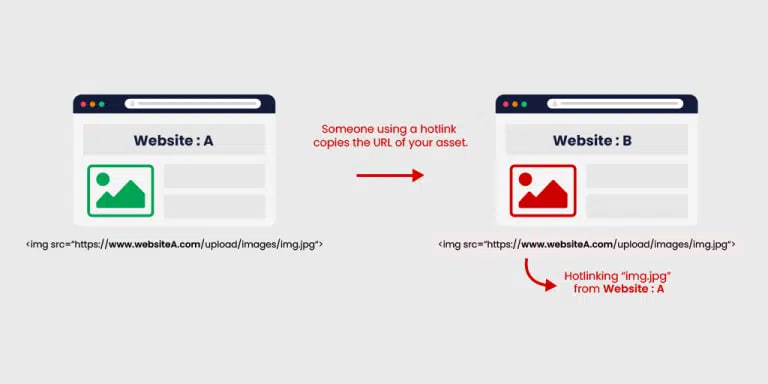
🔍 Main Cause: 1688 Blocks Images Based on Referer
1688 (along with other major e-commerce platforms like Taobao, JD.com, Alibaba) actively prevents “hotlinking” - which is when you take images from their servers and display them directly on your website.
How It Works
When a user’s browser accesses your website and loads an image from https://img.alicdn.com/... (or a similar 1688 domain), 1688’s server will check the HTTP Header Referer - this field indicates which page the user is coming from.
If the Referer is not a 1688 domain (for example, you’re accessing from yourwebsite.com), then 1688 will:
- Return a broken image (usually a “403 Forbidden”, “Hotlinking not allowed”, or a blurred image with “1688” text)
- Or return a 403 status code, causing the image not to display
This is a bandwidth and resource protection measure carefully designed by 1688’s technical team.
💡 Why Does 1688 Do This?
| Reason | Explanation |
|---|---|
| Save bandwidth | Images on 1688 are often very heavy (high resolution, many products). If thousands of other websites hotlink to them, their servers will consume a lot of bandwidth → increased operating costs. |
| Protect copyright & brand | They don’t want their product images to be used for free by competitors or small shops to resell. |
| Drive traffic to original page | If you want to view the product, go to the actual 1688 page — don’t “steal” images to create your own website. |
| Prevent unfair competition | Many people use 1688 images to create shops on Shopee, Lazada, TikTok Shop… without having actual goods → 1688 wants to prevent this. |
✅ Solutions
You cannot legitimately bypass the Referer without permission from 1688. But there are several safe and legal alternative solutions:
1. Download Images and Upload to Your Website
This is the simplest and most effective solution:
- Download images from 1688 → save to your website’s
/images/directory - Use
<img src="https://yourwebsite.com/images/product1.jpg">
Pros: Doesn’t violate laws, won’t be blocked, faster loading speed (doesn’t depend on external servers).
Note: Ensure you don’t violate copyright (if it’s an exclusive product, you should ask the supplier for permission).
2. Use CDN or Image Hosting Services
Services like Cloudinary, Imgur, AWS S3 can be good alternative solutions:
- Upload images to this service → get a new link
- Still ensures independence from 1688
Pros: Optimized images, fast loading speed, can integrate additional features like dynamic image editing.
3. Bypass referer
Disclaimer: Using “bypass referer” may lead to the following risks:
- Violating 1688’s terms of service
- May result in IP or account blocking
- Not sustainable — only temporary
Please consider carefully when using this method.
The following example uses Expressjs to bypass referer. You can use other frameworks to implement similar functionality.
// Use by placing this API in the src of the img tag: <img src=`/proxy-image?url=https://cbu01.alicdn.com/img/ibank/ten_anh.jpg` />
app.get('/proxy-image', async (req, res) => {
  const imageUrl = req.query.url

  if (!imageUrl) {
    return res.status(400).send('Missing "url" query parameter')
  }

  try {
    const parsedUrl = new URL(imageUrl)

    const userAgent = req.headers['user-agent'] || USER_AGENT

    const response = await fetch(imageUrl, {
      headers: {
        Referer: parsedUrl.origin,
        'User-Agent': userAgent,
      },
    })

    if (!response.ok) {
      console.warn(`[Image Proxy] Failed ${response.status}: ${imageUrl}`)
      return res.status(response.status).send(`HTTP ${response.status}`)
    }

    const buffer = await response.arrayBuffer()
    const contentType = response.headers.get('content-type') || 'image/jpeg'

    res.setHeader('Content-Type', contentType)
    res.setHeader('Cache-Control', 'public, max-age=86400')
    res.setHeader('Vary', 'Accept-Encoding')
    res.end(Buffer.from(buffer))
  } catch (error) {
    console.error(`[Image Proxy] Error: ${error.message}`)
    res.status(500).send('Internal Server Error')
  }
})
You can use AI to convert the above code to corresponding programming languages. Additionally, you can also use static proxy servers like nginx to perform this bypass.
🔧 Quick Check: Are You Being Blocked by Referer?
You can easily check if you’re being blocked by referer by:
- Open DevTools (F12) → Network tab
- Reload page → find the image file → click on it
- Check:
- Status: Is it
403 Forbidden? - Response: Do you see a “Hotlinking is not allowed” image?
- Headers → Referer: Is it your domain?
- Status: Is it
If so → you’ve been blocked by referer!
✅ Conclusion
Direct image links from 1688 have referer errors because 1688 actively blocks hotlinking to protect resources and copyright. This is legal behavior and common on major e-commerce platforms.
Best solution: Download images and host them on your website or CDN. Should not try to “hack” referer — easy to get penalized, lose credibility, and not stable.